> For the complete documentation index, see [llms.txt](https://docs.hubble.vote/llms.txt). Markdown versions of documentation pages are available by appending `.md` to page URLs; this page is available as [Markdown](https://docs.hubble.vote/product-guides/actblue-webhooks.md).
# ActBlue Webhooks
{% hint style="info" %}
This feature requires the Finance Hub. You must be a Treasurer or higher in the Universe.
{% endhint %}
Hubble *strongly recommends* ActBlue for online donations. Connect ActBlue to Hubble, and ActBlue sends each donation, cancellation and refund to Hubble automatically.
## Before you start
* ActBlue must approve your committee.
* The ActBlue integration must be on for your Universe. If the **Online Contributions** page shows "ActBlue Integration Disabled", contact [Hubble Support](mailto:help@hubble.vote).
## Step 1: Get your credentials
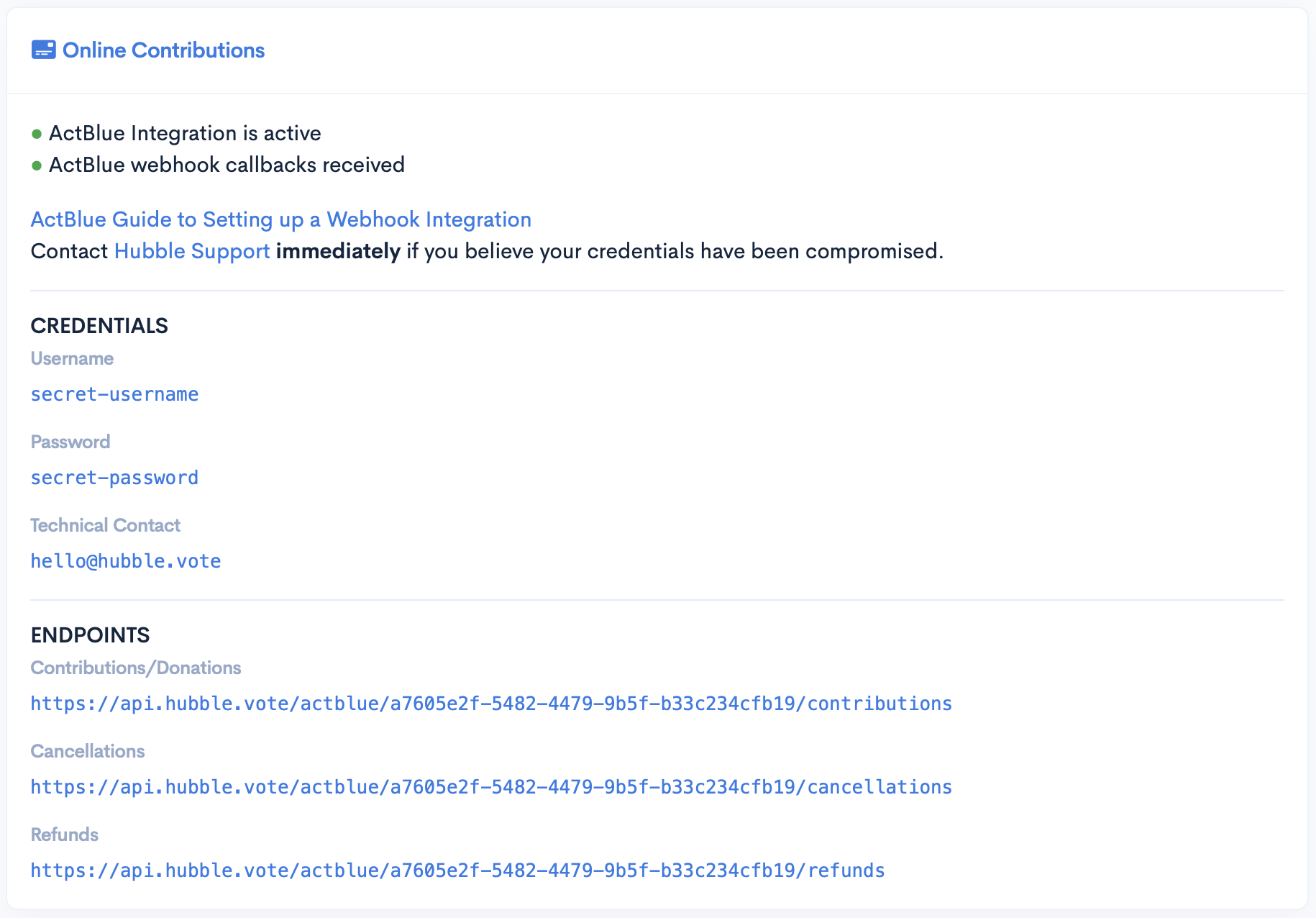
1. In the Admin Hub, open **Online Contributions**.
2. Select **Show credentials**.
3. Copy the **Username** and the **Password**.
4. Copy the three URLs under **Endpoints**.
{% hint style="warning" %}
Keep the username and the password secret. If you think that another person has them, contact Hubble Support immediately.
{% endhint %}
## Step 2: Request the webhooks in ActBlue
1. Follow the ActBlue guide to [request a webhook integration](https://support.actblue.com/campaign_hub/the-dashboard/setting-up-a-webhook-integration/).
2. Request one webhook for each type in the table below. Use the same username and password for each webhook.
3. Optional: enter `hello@hubble.vote` as the technical contact. Hubble Support then gets the updates about your request.
ActBlue type
Hubble endpoint
URL
Default
Contributions
https://api.hubble.vote/actblue/contributions
Default Cancellations
Cancellations
https://api.hubble.vote/actblue/cancellations
Default Refunds
Refunds
https://api.hubble.vote/actblue/refunds
## Step 3: Make sure that it works
After ActBlue sends the first webhook, the **Online Contributions** page shows "ActBlue webhook callbacks received successfully."
If the page shows "Hubble has yet to receive a webhook from ActBlue", examine your webhooks in ActBlue. Make sure that each URL, the username and the password are correct.
## Optional: Pledge pay links
On the same page, you can enter your ActBlue form. If you do not use Hubble Donations, the pay link of a pledge opens this form. The form shows the balance of the pledge. When ActBlue reports the gift, Hubble matches it to the pledge.
## Get help
If you have a question, contact [Hubble Support](mailto:help@hubble.vote).