# Welcome to Hubble

## Overview

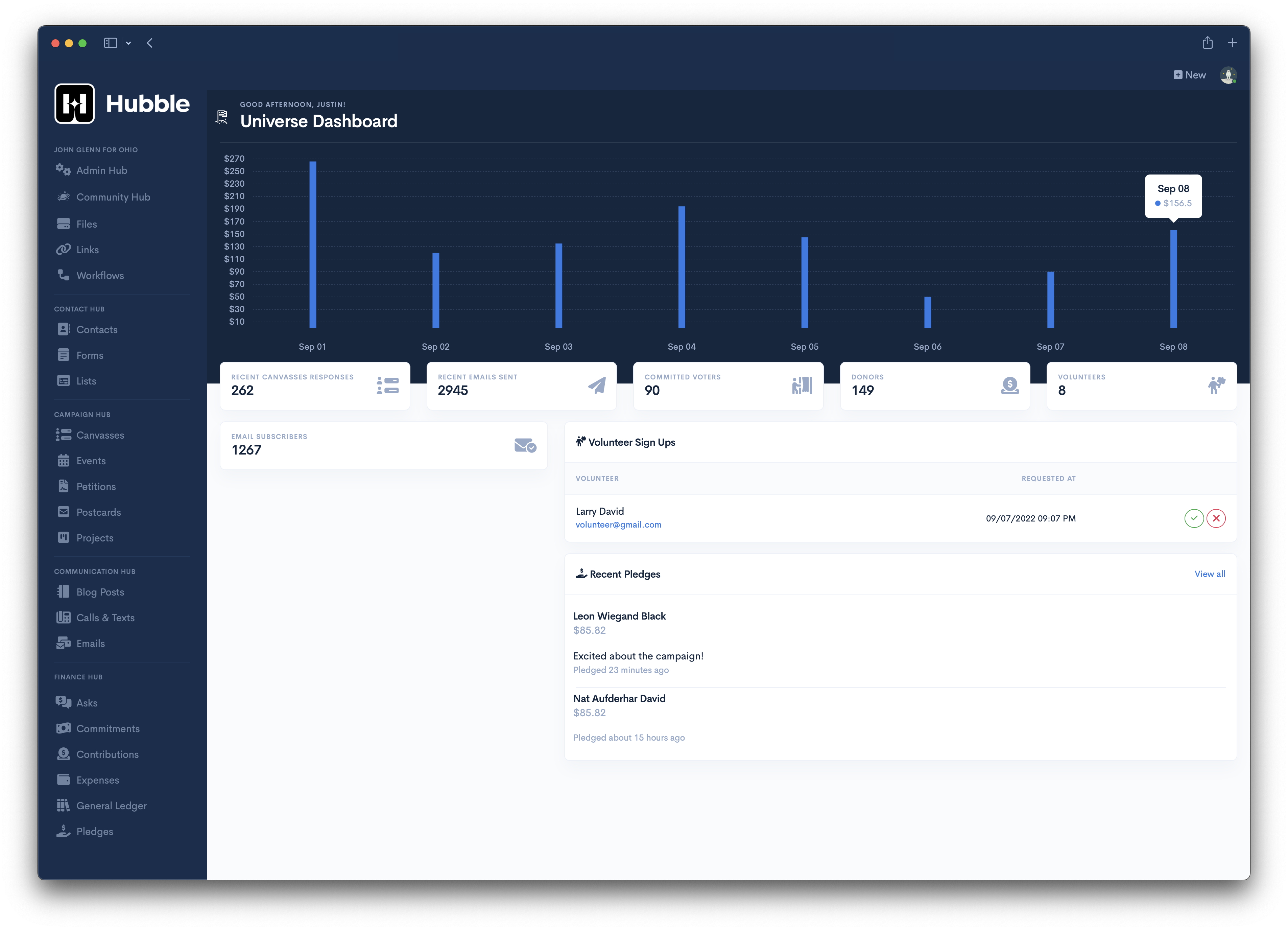
Hubble is the platform to centralize your political campaign. It's got all your voters, donors, and contacts (plus more) all in one place.&#x20;

<figure><img src="https://cdn.hubble.vote/images/screenshots/universe-hub-dashboard.png" alt=""><figcaption><p>Universe Dashboard</p></figcaption></figure>

## Quick links

{% content-ref url="/pages/tyP7AHsTZBon0pkSV8Wd" %}
[Federations](/fundamentals/federations)
{% endcontent-ref %}

{% content-ref url="/pages/lj18sFQ46E0GyJ4cwiYx" %}
[Universes](/fundamentals/universes)
{% endcontent-ref %}

{% content-ref url="/pages/6QExZZKa02oIjw7GokjR" %}
[Multiverses](/fundamentals/multiverses)
{% endcontent-ref %}

## Get Started

We've put together some helpful guides for you to get set up with our product quickly and easily.

{% content-ref url="/pages/tJywDmSviFCHW2WNdp8i" %}
[ActBlue Webhooks](/product-guides/actblue-webhooks)
{% endcontent-ref %}

{% content-ref url="/pages/5y21kqCkVk3kPxKUvCH0" %}
[Mailbox Configuration](/product-guides/mailbox-configuration)
{% endcontent-ref %}


# Federations

Establishes data ownership and serves as the primary vehicle for billing

Any User can create a Federation after account verification. Additional Users can be invited to the Federation to share ownership/billing responsibility. Federation members are responsible for everything that happens within their Federation. A User will continue to have access to Hubble regardless of their membership in a Federation (i.e. campaign volunteers and workers). If someone is not responsible for paying for Hubble – they will more than likely have no idea what a Federation is.

If the Federation is owned by a campaign committee or a political club they’ll more than likely store everything within a default [Universe](/fundamentals/universes). If a Federation needs the ability to segment out their data (i.e. a political party or an agency running multiple campaigns) they’ll have the ability to create additional Universes that are owned by their Federation.

If a Federation needs the ability to share data between Universes, even those owned by another Federation, they’ll be able to create a [Multiverse](/fundamentals/multiverses).


# Universes

Each Universe represents a specific interest (i.e. candidate running for office, local political club, ballot initiative) or uses case of Hubble and serves as the logical grouping of data (account, contacts, events, emails, etc.) that is being tracked.

A Universe is owned by a [Federation](/fundamentals/federations).

Formerly called Committees.


# Multiverses

Sharing data between Universes

A Multiverse is a grouping of [Universes](/fundamentals/universes) that share Contact data with one another. A [Federation](/fundamentals/federations) owner can create a Multiverse can selectively add their Universes to it.

After doing so, the following Contact data is shared

* Name
* Email Addresses
* Phone Numbers
* Touches (past only)
* Tags (must be explicitly shared)


# ActBlue Webhooks

{% hint style="info" %}
This feature requires the Finance Hub.
{% endhint %}

Hubble *strongly recommends* using ActBlue to accept online donations. Once ActBlue has approved your committee, you can follow their guide to [request a webhook integration](https://support.actblue.com/campaign_hub/the-dashboard/setting-up-a-webhook-integration/) between ActBlue and Hubble.

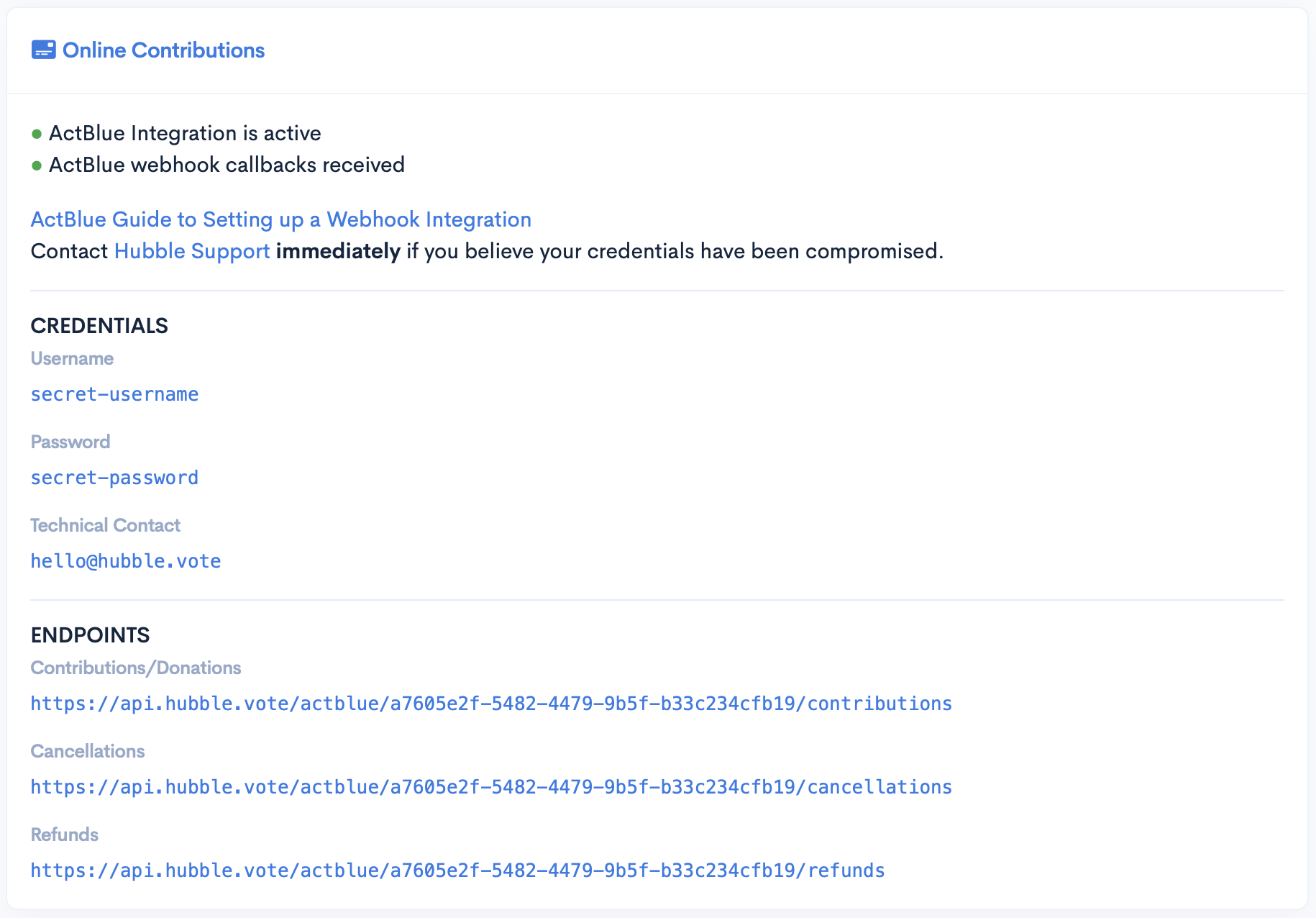
You’ll need a few things from your [Admin Hub](https://app.hubble.vote/admin) to complete the setup.

1. API Username
2. API Password
3. Endpoint URL for each webhook integration

<figure><img src="https://cdn.hubble.vote/images/screenshots/admin-hub-actblue.png" alt=""><figcaption></figcaption></figure>

Optionally, specify `hello@hubble.vote` as the technical contact to keep us in the loop on your webhook requests.

<table data-full-width="true"><thead><tr><th width="227.33333333333337">ActBlue Type</th><th width="224">Hubble Type/Endpoint</th><th>URL</th></tr></thead><tbody><tr><td>Default</td><td>Contributions</td><td><code>https://api.hubble.vote/actblue/contributions</code></td></tr><tr><td>Default Cancellations</td><td>Cancellations</td><td><code>https://api.hubble.vote/actblue/cancellations</code></td></tr><tr><td>Default Refunds</td><td>Refunds</td><td><code>https://api.hubble.vote/actblue/refunds</code></td></tr></tbody></table>

Contact [Hubble Support](mailto:help@hubble.vote) if you have any questions.


# Mailbox Configuration

{% hint style="info" %}
This feature requires the Communication Hub.
{% endhint %}

You’ve designed eye-catching emails in Hubble, and you want to make sure that everyone in your network is seeing them. With 10 minutes of work, you can guarantee emails are delivered to inboxes, not spam folders.

#### Overview  <a href="#overview" id="overview"></a>

Hubble uses Amazon Web Services to deliver emails and must register each domain used to send emails. After you create a [Mailbox in the Admin Hub](https://app.hubble.vote/mailboxes), Hubble Support is alerted, and the process is kicked off.

#### MX <a href="#spf" id="spf"></a>

[Mail Exchange (MX) DNS](https://www.cloudflare.com/learning/dns/dns-records/dns-mx-record/) records help direct emails to a mail server.&#x20;

We'll use the values below to create a record for `hubble.yoursite.com.`

<table><thead><tr><th width="211">Field</th><th>Value</th></tr></thead><tbody><tr><td>Type</td><td><code>MX</code></td></tr><tr><td>Name/Host</td><td><code>hubble</code></td></tr><tr><td>Content/Value</td><td><code>feedback-smtp.us-east-2.amazonses.com</code></td></tr><tr><td>Priority</td><td><code>10</code></td></tr><tr><td>Time to Live (TTL)</td><td><code>3600</code> or <code>Auto</code></td></tr></tbody></table>

#### SPF  <a href="#spf" id="spf"></a>

[Sender Policy Framework (SPF) DNS](https://www.cloudflare.com/learning/dns/dns-records/dns-spf-record/) records are a type of DNS TXT record commonly used for email authentication. SPF records include IP addresses and domains authorized to send emails from that domain.

In our case, we are authorizing all emails sent by `hubble.yoursite.com` to originate from IP addresses owned by `amazonses.com.`

<table><thead><tr><th width="211">Field</th><th>Value</th></tr></thead><tbody><tr><td>Type</td><td><code>TXT</code></td></tr><tr><td>Name/Host</td><td><code>hubble</code></td></tr><tr><td>Content/Value</td><td><code>v=spf1 include:amazonses.com ~all</code></td></tr><tr><td>Time to Live (TTL)</td><td><code>3600</code> or <code>Auto</code></td></tr></tbody></table>

#### DKIM  <a href="#dkim" id="dkim"></a>

[DomainKeys Identified Mail (DKIM) DNS](https://www.cloudflare.com/learning/dns/dns-records/dns-dkim-record/) records are specialized DNS TXT records that store the public key to verify an email’s authenticity.

When Hubble Support registers your domain with AWS, they will be given three (3) CNAME records that must be created (by you) before DKIM is enabled.

#### DMARC <a href="#spf" id="spf"></a>

[Domain-based Message Authentication Reporting and Conformance (DMARC)](https://www.cloudflare.com/learning/dns/dns-records/dns-dmarc-record/) DNS records are used to when authenticating email messages. A DMARC policy tells a receiving email server what to do after checking a domain's SPF and DKIM records.

<table><thead><tr><th width="211">Field</th><th>Value</th></tr></thead><tbody><tr><td>Type</td><td><code>TXT</code></td></tr><tr><td>Name/Host</td><td><code>_dmarc</code></td></tr><tr><td>Content/Value</td><td><code>v=DMARC1; p=reject;</code></td></tr><tr><td>Time to Live (TTL)</td><td><code>3600</code> or <code>Auto</code></td></tr></tbody></table>


# Canvassing

Hit the road with Hubble Mobile

No more clipboards. Now you can take your campaign directly to voters’ doorsteps with tools built for real field work.

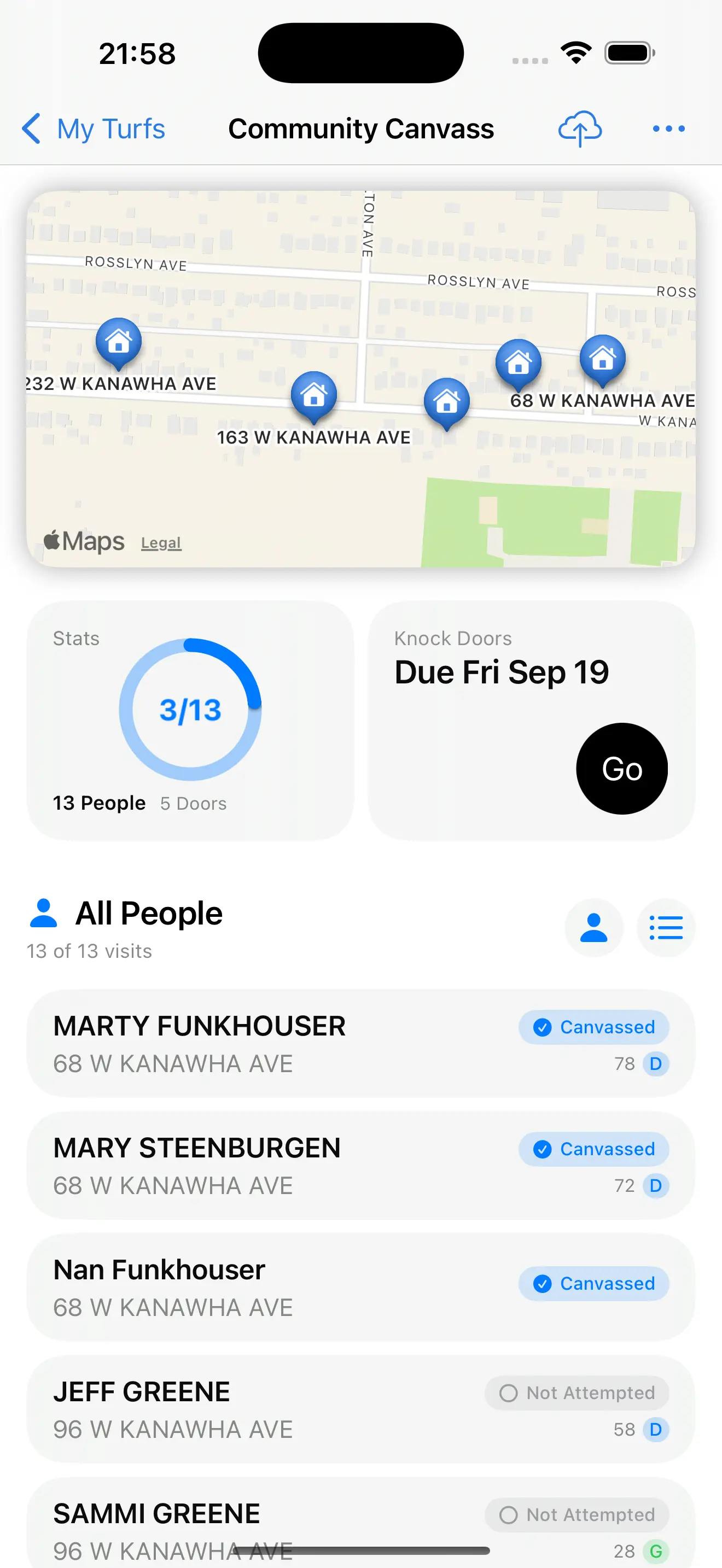
<figure><img src="https://cdn.hubble.vote/images/screenshots/apple/turf-iphone.webp" alt="Screenshot of Hubble Mobile showing the Turf View" width="375"><figcaption></figcaption></figure>

**Offline-First Design**: Access your turf assignments, contact information, and response forms even without cell service. Everything syncs automatically when you’re back online, so no data is ever lost.

**Work Multiple Turfs at Once**: Seamlessly work multiple turf assignments without losing your place. Perfect for volunteering with multiple campaigns.

**Smart Response Recording**: Support for 8 different question types means you can capture exactly the voter feedback your campaign needs, from simple yes/no responses to detailed notes and numeric scales.

**Map View**: Visualize your entire turf with an interactive map that shows completed and remaining addresses. Navigate efficiently by seeing your route at a glance and never lose track of where you’ve been.

**Search**: Find specific voters instantly by name or address. No more shuffling through papers to find the contact you need, whether you’re following up on a callback or looking for a specific household.

**Household Efficiency**: Copy responses to other household members with one tap, making large household visits fast and accurate.

**Live Activities**: See your next destination right from your lock screen or while using other apps. Never lose track of where you’re headed next.

**Widgets**: Stay on top of your canvass stats right from your home screen.

Download it from the [App Store](https://apps.apple.com/us/app/hubble-mobile/id1538305521) today.